
What Is a Tech Stack? A Beginner’s Guide
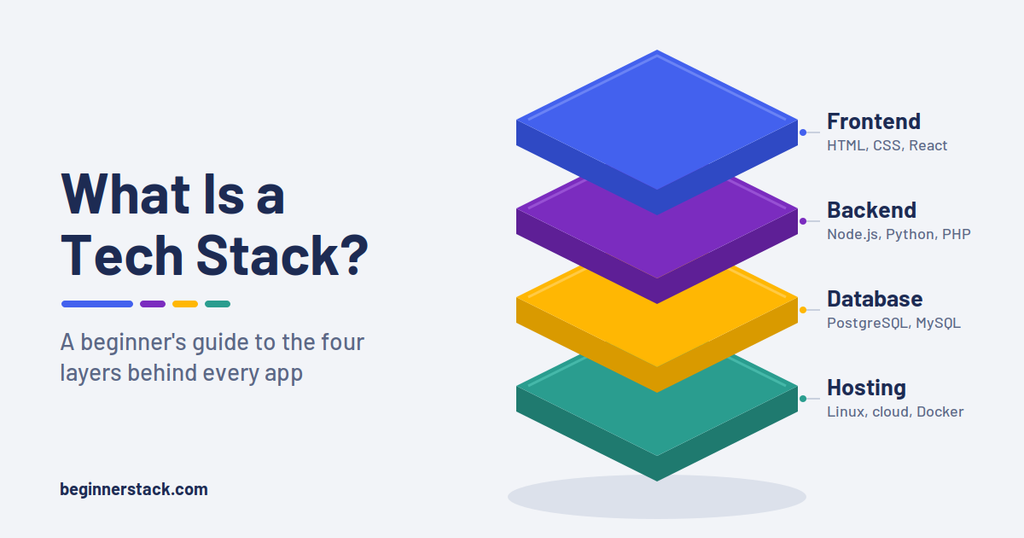
Every app you use, from Netflix to your bank’s mobile app, runs on a tech stack. Put simply, a tech stack is the set of programming languages, frameworks, databases, and tools that work together to build and run a piece of software. If you have ever read a job post asking for “React, Node.js, and PostgreSQL” and wondered how those pieces fit together, this guide is for you.
Understanding stacks early saves beginners a lot of confusion. Instead of seeing hundreds of random tools, you start to notice a few clear layers, each with a specific job. As a result, you can plan what to learn, follow tutorials with more confidence, and make smarter choices for your first project.
In this beginner’s guide, you will learn what a technology stack is, where the name comes from, and which layers every web application needs. You will also explore the most popular stacks in 2026, real examples, a simple way to choose your own, and the mistakes that trip up most new developers. No coding experience is required.
What Is a Tech Stack?
A tech stack is the complete combination of technologies used to build, run, and maintain a software product. Developers also call it a technology stack, a software stack, or a solution stack. All of these terms describe the same idea: a group of tools chosen to work together.
Think of a restaurant. Guests see the dining room, the menu, and the plates that arrive at their table. Behind the kitchen doors, however, cooks prepare the food, a pantry holds the ingredients, and suppliers deliver fresh stock every morning. Each part depends on the others. If the pantry is empty, even the best chef cannot serve dinner.
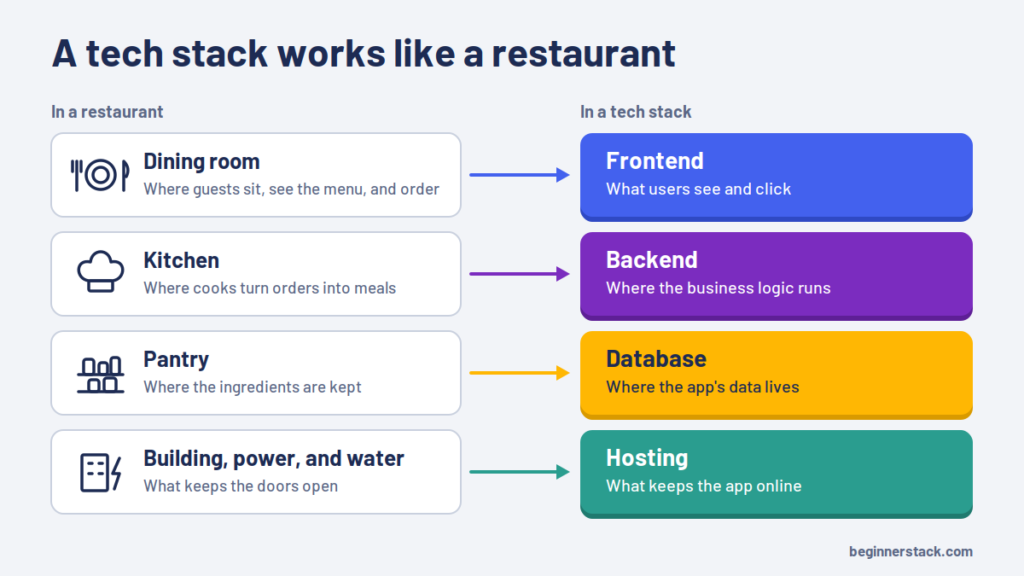
Software works the same way. In this picture, the dining room is the frontend, the part users see and click. The kitchen is the backend, where the business logic runs. Meanwhile, the pantry is the database, which stores information such as user accounts and orders. Finally, the building itself, with its power and water supply, is the hosting infrastructure that keeps everything online.
As a result, every web tech stack answers four basic questions:
- What does the user see and interact with? (frontend)
- What processes their requests? (backend)
- Where is the data saved? (database)
- Where does the application live? (hosting and infrastructure)
Every project answers these questions differently. A personal blog might run on WordPress, PHP, MySQL, and shared hosting. On the other hand, a modern web app might use React, Node.js, PostgreSQL, and a cloud platform. Both choices are valid, because the right tech stack depends on what you are building.
It also helps to know what a tech stack is not. A single tool, such as React, covers only one layer, so it is not a full stack on its own. The stack is the whole recipe, not any single ingredient on the shelf.
Why Developers Call It a “Stack”
The word “stack” comes from the way these technologies sit on top of each other. At the bottom, you have the operating system and the server. Above that sits the database, then the backend code, and finally the user interface at the top. Each layer relies on the one beneath it, much like plates stacked in a cupboard.
That is why most diagrams show a tech stack as a vertical tower, with users at the top and hardware at the bottom.
The idea became popular in the late 1990s with the acronym LAMP, which stands for Linux, Apache, MySQL, and PHP. German computer journalist Michael Kunze coined the term in 1998 in an article for the magazine c’t. In it, he showed that a bundle of free, open-source software could replace expensive commercial server packages. The name stuck because it was short, memorable, and described a complete working toolkit.
Since then, developers have invented dozens of similar acronyms, including MEAN, MERN, and MEVN. However, most real teams do not follow an acronym exactly. Instead, they mix and match tools to fit their needs, which is why you will often hear people describe their stack as a simple list of tools rather than a catchy name.
The Layers of a Tech Stack
Most web applications share the same basic layers. Once you understand each one, any tech stack becomes much easier to read. The table below gives a quick overview, and the sections that follow explain each layer in plain English.
| Layer | What it does | Common examples |
|---|---|---|
| Frontend | Displays the interface and handles user interaction | HTML, CSS, JavaScript, React, Vue.js, Angular |
| Backend | Runs business logic and processes requests | Node.js, Python (Django, FastAPI), PHP (Laravel), Java (Spring Boot), C# (ASP.NET Core) |
| Database | Stores and retrieves data | PostgreSQL, MySQL, MongoDB, SQLite, Redis |
| Hosting and infrastructure | Keeps the app online and reachable | Shared hosting, Vercel, Render, AWS, Google Cloud, Azure |
| APIs and services | Connect the app to outside features | Payment, email, maps, and AI model APIs |
| Developer tools | Help teams build, test, and ship code | Git, GitHub, VS Code, Docker, CI/CD pipelines |
Frontend: What Users See
The frontend, also called the client side, is everything that runs in the user’s browser or on their phone. It includes the layout, colors, buttons, forms, and animations.
Every frontend in a web tech stack starts with three core languages. HTML defines the structure of a page, CSS controls how it looks, and JavaScript makes it interactive. In Stack Overflow’s 2025 Developer Survey, 66% of respondents reported using JavaScript, and about 62% used HTML and CSS.
On top of these basics, most teams add a frontend framework or library. React is the most widely used, while Vue.js, Angular, and Svelte are popular alternatives. These tools let you build complex interfaces from small, reusable components. For example, a single “product card” component can display every item in an online store.
Backend: The Logic Behind the Scenes
The backend, or server side, handles the work users never see. When you log in, the backend checks your password. Similarly, when you place an order, it calculates the total, processes the payment, and saves the purchase.
Popular backend options include:
- Node.js with Express, which lets you write server code in JavaScript
- Python with Django, Flask, or FastAPI
- PHP with Laravel or WordPress
- Java with Spring Boot
- C# with ASP.NET Core
- Ruby with Ruby on Rails
Node.js led the web frameworks and technologies category in the 2025 survey, with nearly 49% of respondents using it. Its biggest advantage for beginners is simple: you can use one language, JavaScript, for both the frontend and the backend of your tech stack.
Database: Where Your Data Lives
Every app that remembers anything needs a database. User profiles, blog posts, shopping carts, and messages all live here.
Databases fall into two broad groups. Relational (SQL) databases, such as PostgreSQL and MySQL, store data in tables with rows and columns. They work well when your data has clear relationships, like customers and their orders. NoSQL databases, such as MongoDB, store flexible documents that look similar to JSON. For that reason, they suit data that changes shape often.
PostgreSQL has become the default database for many teams. In the 2025 survey, 55.6% of developers used it, well ahead of MySQL at 40.5%. It also ranked as both the most admired and the most desired database. Interestingly, people who are learning to code still use MySQL most often, likely because so many tutorials and hosting plans include it.
Many apps also add Redis, an in-memory data store used for caching. Caching keeps frequently requested data in fast memory, so pages load quicker. The survey recorded an 8-point jump in Redis usage, which shows how common caching has become in a modern tech stack.
Hosting and Infrastructure
Your code needs a home on the internet. The hosting layer of a tech stack includes the servers, operating systems, and cloud services that keep your app running around the clock.
Options range from simple to advanced. Shared hosting from providers like Hostinger works well for WordPress blogs. Platforms like Vercel, Netlify, Render, and Railway deploy modern apps straight from GitHub. At the top end, AWS, Google Cloud, and Microsoft Azure offer almost unlimited control and scale. If you are ready to put a Node.js project online, our guide on where to deploy your first Node.js app covers the best beginner options, and our Render vs Railway comparison breaks down their free plans.
This layer also includes the plumbing that connects visitors to your server. DNS translates your domain name into a server address, and HTTPS encrypts the traffic between the browser and the server. If those terms are new to you, read how DNS works and HTTPS and SSL certificates explained before your first launch.
Containers belong here too. Docker packages an app with everything it needs, so it runs the same way on your laptop and on the server. Docker usage jumped 17 percentage points between 2024 and 2025, the largest increase of any technology in the Stack Overflow survey. Today, about 71% of respondents use it.
APIs, Services, and Developer Tools
Few modern apps build every feature from scratch. Instead, they connect to outside services through APIs (application programming interfaces). An API is a set of rules that lets two programs talk to each other. For instance, an online store might use Stripe for payments, an email service for receipts, and Google Maps for delivery addresses.
Finally, every professional tech stack includes tools that help developers work together. Git tracks every change to your code, and GitHub stores it online so teams can collaborate. A code editor such as VS Code, automated tests, and deployment pipelines (often called CI/CD) complete the picture. New to version control? Our roundup of Git tools for beginners is a great place to start.
Frontend vs. Backend vs. Full Stack Development
Once you know the layers, common job titles make more sense. Developers usually specialize in one part of the tech stack, or they learn enough to work across all of it.
| Role | Main focus | Core skills | Typical tools |
|---|---|---|---|
| Frontend developer | What users see and interact with | HTML, CSS, JavaScript, responsive design, accessibility | React, Vue.js, Angular, Tailwind CSS |
| Backend developer | Server logic, data, and security | A server language, APIs, databases, authentication | Node.js, Django, Spring Boot, PostgreSQL |
| Full stack developer | The complete application | A working mix of frontend and backend skills | MERN, Next.js, Django with React |
A full stack developer is not an expert in everything. Rather, they understand how the layers connect and can build a complete feature, from the database table to the button on the screen. Many beginners aim for full stack skills because those skills let them build and launch small projects on their own.
That said, there is no wrong path. If you love design and visual detail, frontend work may suit you best. If you prefer logic, data, and problem-solving, the backend could be a better fit. Either way, understanding the whole tech stack helps you work better with teammates on the other side.
The Most Popular Tech Stack Options in 2026
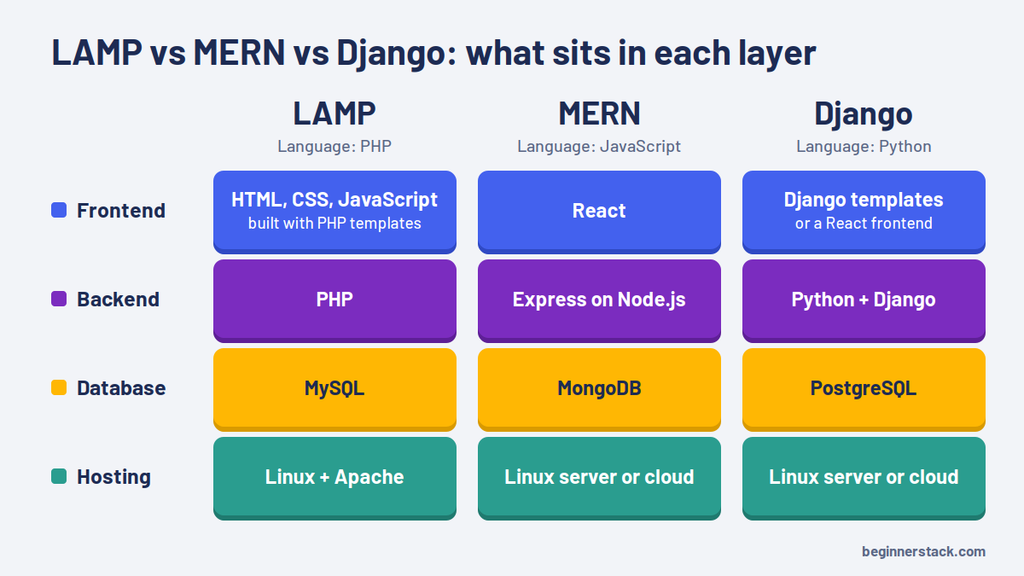
Some combinations of tools are so common that they have their own names. Learning them gives you a shared vocabulary with other developers and a proven starting point for your own projects. Here are the options you will meet most often, starting with the classic tech stack that still powers much of the web.
The LAMP Tech Stack
LAMP stands for Linux (operating system), Apache (web server), MySQL (database), and PHP (programming language). It is one of the oldest open-source stacks, and it still runs a huge share of the web. The main reason is WordPress, which runs on PHP and MySQL. According to W3Techs, WordPress powers roughly four in ten websites worldwide.
Variations are common. Many hosts swap Apache for Nginx, a setup often called LEMP, or replace MySQL with MariaDB. This tech stack is a great fit for blogs, business websites, and online magazines. Hosting is cheap and widely available, and managed hosts handle most of the server work for you. If you run WordPress, our Kinsta vs Cloudways comparison shows how managed hosting simplifies this layer.
MEAN, MERN, and MEVN
These three stacks share the same backbone: MongoDB for the database, Express for the backend framework, and Node.js as the runtime. The only difference is the frontend:
MongoDB developer Valeri Karpov coined the MEAN name in 2013, and the other variants followed. Their big selling point is that JavaScript runs through every layer. You write the interface, the server logic, and even the database queries in one language. As a result, beginners can master one language instead of juggling several.
MERN is the most popular of the three, thanks to React’s dominance. It is a common choice for single-page apps, dashboards, social platforms, and bootcamp projects. However, many teams now replace MongoDB with PostgreSQL when their data has strong relationships, so treat the acronym as a starting point rather than a strict rule. This JavaScript tech stack is also easy to deploy on the beginner platforms mentioned earlier.
Jamstack and Static-First Sites
Jamstack stands for JavaScript, APIs, and Markup. Instead of building each page on a server when someone visits, a Jamstack site generates pages ahead of time and serves them from a content delivery network (CDN). Dynamic features, such as forms or search, come from APIs.
The result is fast, secure, and cheap to host. Frameworks such as Astro, Eleventy, Hugo, and Next.js are common choices, often paired with hosts like Netlify or Vercel. The Jamstack name itself has faded in recent years, and its main community spaces have wound down. Still, the approach won. Prebuilt pages plus APIs is now simply how much of the modern web works, with or without the label.
The Python and Django Tech Stack
Among people learning to code, Python is the most used language, at about 72% in the 2025 Stack Overflow survey. It also fits neatly into a web tech stack. A typical Python setup pairs Django or FastAPI on the backend with PostgreSQL and either Django templates or a JavaScript frontend such as React.
Developers describe Django as a “batteries included” framework. It ships with user authentication, an admin panel, and built-in security protections. FastAPI, meanwhile, is a lighter option for building APIs quickly, and its usage grew by five percentage points in the 2025 survey. Python adoption overall rose seven points that year, largely because it is the go-to language for AI and data science. That makes this option attractive if you want to build web apps with machine learning features.
Ruby on Rails and .NET
Ruby on Rails helped shape modern web development in the 2000s. Developers still love it for how quickly it turns ideas into working products. GitHub, Shopify, and Basecamp all run on Rails, and it suits startups that want a productive tech stack with a small team.
The Microsoft .NET platform uses C# with ASP.NET Core, often paired with SQL Server or PostgreSQL and hosted on Azure. It is popular in large companies, banks, and government systems. Modern .NET also runs on Windows, macOS, and Linux, so it no longer depends on Microsoft servers.
Modern TypeScript Stacks: Next.js and T3
TypeScript adds type checking to JavaScript, which catches many bugs before your code runs. Next.js, a React framework, lets you build the frontend and the backend in a single project. It also handles routing, server rendering, and API endpoints for you.
The T3 Stack builds on this idea. It combines Next.js, TypeScript, Tailwind CSS, tRPC, a database toolkit (ORM) such as Prisma or Drizzle, and NextAuth.js for logins. Solo developers and startups like it because it offers a type-safe full stack setup with very little configuration.
Backend-as-a-Service Options
Some projects skip building a custom backend entirely. Services like Supabase and Firebase provide a database, user authentication, file storage, and APIs through a simple dashboard. You connect them to a frontend built with React, Vue, or a mobile framework, and you are ready to go.
This approach is ideal for prototypes, hackathons, and solo founders. It also appeals to beginners, because you can launch a real product without managing servers or wiring together every layer of a tech stack yourself. Better still, Supabase runs on PostgreSQL, so the skills you learn there transfer directly to larger projects.
Tech Stack Comparison at a Glance
The table below sums up each tech stack covered in this section, so you can compare them side by side.
| Stack | Core components | Main language | Best for | Learning curve |
|---|---|---|---|---|
| LAMP | Linux, Apache, MySQL, PHP | PHP | Blogs, business sites, WordPress | Gentle |
| MERN | MongoDB, Express, React, Node.js | JavaScript | Web apps, dashboards, single-page apps | Gentle |
| MEAN | MongoDB, Express, Angular, Node.js | JavaScript and TypeScript | Structured, enterprise-style web apps | Moderate |
| Jamstack | Static site generator, CDN, APIs | JavaScript | Marketing sites, documentation, blogs | Gentle |
| Python and Django | Python, Django, PostgreSQL | Python | Data-driven apps, AI features | Gentle |
| Ruby on Rails | Ruby, Rails, PostgreSQL | Ruby | Startups and fast prototypes | Moderate |
| .NET | C#, ASP.NET Core, SQL Server, Azure | C# | Enterprise and finance software | Moderate |
| T3 and Next.js | Next.js, TypeScript, Tailwind CSS, tRPC, Prisma | TypeScript | Full stack SaaS products | Moderate |
| Backend-as-a-Service | React or Flutter plus Supabase or Firebase | JavaScript or Dart | Prototypes and MVPs | Gentle |
What a Real Tech Stack Looks Like
Acronyms are helpful, but real projects make the idea click. Here are three realistic examples, from simple to more advanced.
Example 1: A Personal Blog
- Frontend: a WordPress theme built with HTML, CSS, and JavaScript
- Backend: WordPress core, written in PHP
- Database: MySQL or MariaDB
- Hosting: shared or managed WordPress hosting, plus a domain from a registrar such as Cloudflare
- Extras: an SEO plugin, a caching plugin, and a free SSL certificate
This setup costs only a few dollars a month and needs almost no coding. It is a textbook LAMP-style tech stack, and many successful niche blogs run on exactly this combination. For the domain step, see our guide on how to connect a Cloudflare domain to your web host.
Example 2: A Small SaaS App
- Frontend: Next.js with React and Tailwind CSS
- Backend: Next.js API routes or a separate Node.js server
- Database: PostgreSQL, through Supabase or a managed cloud database
- Authentication: a service such as Auth.js, Clerk, or Supabase Auth
- Payments: Stripe
- Hosting: Vercel, with GitHub for version control
A solo developer can build and launch a product like this in a few weeks. Because most pieces are managed services, there is very little server work to worry about. In fact, many indie founders choose a tech stack very close to this one.
Example 3: A Mobile App
- Frontend: React Native or Flutter for one codebase across iOS and Android, or native Swift and Kotlin
- Backend: Firebase, or a custom Node.js or Python API
- Database: Cloud Firestore or PostgreSQL
- Extras: push notifications, analytics, and crash reporting
Mobile apps follow the same layered idea. The only real difference is that the frontend runs on a phone instead of in a browser. Beyond that, the rest of the tech stack, including the backend, the database, and the APIs, works in exactly the same way.
How to Choose the Right Tech Stack
There is no single best tech stack. The right choice depends on your project, your skills, and your goals. Use the following four factors as a checklist before you commit.
1. Start With What You Are Building
Your project type narrows the options quickly. For a content website or blog, WordPress or a static site generator makes sense. A data-heavy app with complex relationships favors a relational database like PostgreSQL. Real-time chat apps benefit from Node.js, which handles many simultaneous connections well. Meanwhile, a mobile-first product needs React Native, Flutter, or native tools.
Also consider the size of the project. A weekend prototype does not need the same setup as a banking platform. Choose a tech stack that matches the scale you expect over the next year, not the next decade.
2. Build on the Skills You Already Have
If you or your team already know JavaScript, a MERN or Next.js setup will make you productive fastest. If you know Python, Django or FastAPI makes more sense. On the other hand, learning a brand-new language and a new framework at the same time slows every project down.
For solo beginners, fewer languages is better. That is the main reason JavaScript-only stacks are so popular in bootcamps and online courses.
3. Check the Community, Documentation, and Job Market
Popular tools come with more tutorials, more forum answers, and more libraries that solve common problems. When you get stuck late at night, a large community matters more than a clever feature list.
Popularity also affects your career. Before you choose, search job boards in your area for each option. The annual Stack Overflow survey shows which tools developers use and admire, while StackShare shows the stacks that real companies publish. Together, they give you a realistic picture of which tech stack skills employers want.
4. Weigh Cost, Scalability, and Security
Budget matters, especially for side projects. Open-source tools like PostgreSQL, Django, and React are free, but hosting, databases, and third-party services can add up. So always check free-tier limits before you build.
Scalability is the ability to handle more users without slowing down or breaking. Most mainstream stacks scale well enough for small and medium projects, so avoid over-engineering early. Security, however, matters from day one. Choose actively maintained frameworks that include protection against common attacks, such as SQL injection and cross-site scripting. The OWASP Top 10 is a helpful list of the risks every tech stack should guard against.
The Best Tech Stack for Beginners
If you are just starting out, pick one path and stay with it for at least a few months. Jumping between stacks is one of the biggest reasons beginners stall. For most people, a JavaScript-based web tech stack is the most practical starting point. Here is a sensible learning order:
- HTML and CSS. Build a few static pages and learn how layout works. The free MDN Learn web development course is an excellent place to begin.
- JavaScript fundamentals. Learn variables, functions, arrays, objects, and how to change a page with the DOM.
- Git and GitHub. Save your work and begin a public portfolio.
- React. Learn components, props, and state.
- Node.js and Express. Build a simple API that returns data.
- A database. Start with PostgreSQL or MongoDB and practice basic queries.
- Deployment. Put a complete project online with Vercel, Render, or a similar platform.
Prefer Python? Then swap steps 4 to 6 for Django or FastAPI with PostgreSQL, and add a simple frontend later. Both routes lead to the same place: a complete tech stack you understand and a working full stack project you can show to employers or clients.
The right learning resources make this path easier. Our comparison of Codecademy vs DataCamp vs Udemy can help you pick a course platform. In addition, our list of the best AI tools to learn programming faster shows how to get help without letting a chatbot do all your thinking.
A Tiny Tech Stack Example in JavaScript
Here is a small example of how two layers talk to each other. The language is JavaScript on both sides: the backend uses Node.js with Express, and the frontend is plain browser JavaScript.
// server.js (backend: Node.js + Express)
const express = require("express");
const app = express();

// Serve the frontend files from the "public" folder
app.use(express.static("public"));

// A simple API endpoint that returns JSON
app.get("/api/greeting", (req, res) => {
  res.json({ message: "Hello from the backend!" });
});

app.listen(3000, () => {
  console.log("Server running at http://localhost:3000");
});
<!-- public/index.html (frontend page) -->
<p id="greeting">Loading...</p>
<script src="app.js"></script>// public/app.js (frontend: browser JavaScript)
fetch("/api/greeting")
.then((response) => response.json())
.then((data) => {
document.querySelector("#greeting").textContent = data.message;
});To try it, run npm install express, then node server.js, and open http://localhost:3000 in your browser. The page asks the backend for data, and the backend replies with JSON. In a real app, the backend would read that message from a database instead of hard-coding it. That round trip, from browser to server to database and back, is the heart of every web application.
How to Find Out What Tech Stack a Website Uses
Curious about the tools behind your favorite sites? You can often identify them in seconds with these methods:
- Browser extensions. Wappalyzer detects frameworks, content management systems, analytics tools, and hosting providers as you browse.
- Lookup websites. BuiltWith shows a technology profile for almost any domain.
- Engineering blogs. Many companies explain their tool choices on their engineering blogs or on StackShare.
- Job listings. A company’s job posts usually name the exact tools its developers use every day.
- Browser developer tools. Right-click a page, choose Inspect, and check the Network and Sources tabs. For example, file paths containing
/wp-content/point to WordPress, while a/_next/folder suggests Next.js.
Studying real websites is one of the fastest ways to learn. It shows you which tech stack combinations hold up in production, not just in tutorials.
Common Tech Stack Mistakes Beginners Make
Choosing tools is exciting, but a few common errors can derail your first projects. Watch out for these:
- Chasing trends. A new framework goes viral almost every month. Picking tools because they are fashionable, rather than because they fit the project, leads to half-finished apps.
- Overbuilding too early. Microservices, Kubernetes, and multiple databases solve problems that large companies face. A beginner project rarely needs any of them.
- Learning too many tools at once. Mastering one complete path beats knowing a little about ten frameworks.
- Ignoring the database. Many new developers focus on the interface and treat data as an afterthought. Poor database design causes problems that are hard to fix later.
- Skipping security basics. Hard-coded passwords, missing HTTPS, and unchecked user input are common and completely avoidable.
- Forgetting maintenance. Every tool you add is one more thing to update and patch. Keep your tech stack as small as the project allows.
In short, simple and finished beats complex and abandoned. You can always add tools once a real problem demands them.
How AI Coding Tools Fit Into Your Tech Stack
AI assistants are now a standard part of the developer toolkit. Editors such as Cursor and GitHub Copilot suggest code, explain errors, and write tests, while agents such as Claude Code can work across an entire project. In the 2025 Stack Overflow survey, about 18% of respondents already used Cursor, and nearly 10% used Claude Code.
For beginners, these tools cut both ways. They speed up learning and remove tedious work. However, they can also hide how your tech stack actually works. If an AI writes your Express routes and database queries, make sure you can read and explain every line. Our guide to the best AI coding assistants for beginners and our Cursor vs Windsurf vs GitHub Copilot comparison can help you pick one that supports learning rather than replacing it.
AI App Builders and AI Services
AI app builders go a step further. Tools like Bolt.new, Lovable, and Replit generate a full app from a text prompt, choosing the tech stack for you behind the scenes. Often, that means React on the frontend with Supabase or a Node.js backend. Knowing the layers in this guide helps you understand, fix, and extend what these tools produce. For a closer look, see our Bolt.new vs Lovable vs Replit comparison, and learn how to write better prompts for AI coding tools to get cleaner results.
AI can also be a layer inside your product. Many apps now call models from OpenAI, Anthropic, or Google through an API to add chat, search, or summarization features. In that case, the AI service is just another part of your tech stack, similar to a payment or email API.
Tech Stack FAQs
Is HTML part of a tech stack?
Yes. HTML and CSS form the foundation of every web frontend. They are markup and styling languages rather than programming languages, but no website works without them.
What is the easiest tech stack to learn?
For most beginners, a JavaScript-based setup such as MERN or Next.js is the easiest, because one language covers both the frontend and the backend. If you already know Python, Django is just as approachable. For non-coders who simply want a website, WordPress on a LAMP stack requires the least code.
What is the difference between a tech stack and a framework?
A framework is a single tool that gives structure to one part of an app, such as React for the interface or Django for the server. In contrast, a tech stack is the full collection of tools, which usually includes several frameworks, a database, and hosting.
Can you change your tech stack later?
Yes, but it is expensive. Rewriting a working app in new technologies takes time and introduces new bugs. For this reason, most companies change one layer at a time, for example by moving from MySQL to PostgreSQL or by adding React to an older site. That is why choosing carefully at the start pays off.
Is WordPress a tech stack?
Not by itself. WordPress is a content management system that runs on a stack, usually PHP, MySQL or MariaDB, and a Linux server with Apache or Nginx. Together, those pieces form a classic LAMP or LEMP setup.
Do non-developers need to understand this?
It helps a lot. Founders, product managers, marketers, and recruiters all make better decisions when they know which tools a product relies on. You do not need to write code, but knowing the layers of a tech stack lets you ask sharper questions.
Final Thoughts: Start Building Your First Tech Stack
A tech stack is simply the set of tools that bring software to life. It includes a frontend that users see, a backend that handles logic, a database that stores information, and hosting that keeps everything online. Once you recognize those layers, job posts, tutorials, and product pages stop looking like alphabet soup.
So start small. Pick one proven option, such as MERN, Next.js, or Django with PostgreSQL, and build a real project from start to finish. Then deploy it, share it, and learn from whatever breaks. Your first tech stack does not need to be perfect. It just needs to be finished.
Ready for the next step? Browse our beginner-friendly tutorials in Build With It and Hosting & Deployment, and bookmark BeginnerStack for honest, tested reviews of the tools that belong in your stack.